Case Studies
Products I have shaped and built.
A closer look at mobile products, interaction design, and the engineering decisions behind them.
Meeting people beyond the swipe
DAIT is a social matching app created for the Spanish market, starting with its first community in Madrid.
As co-founder and sole app engineer, I built the mobile experience end to end with React Native and Expo, shaping product scope, interaction details, and parts of the product language alongside the team.
Lead App EngineeringReact Native / ExpoProduct
Co-founder, lead app engineer, product scoping.
A social matching app designed for the Spanish market, with Madrid as its first community.
React Native and Expo, gesture-heavy interactions, deep links, privacy-aware AI flows.
The app's visual design was led primarily by a collaborator; I contributed product scoping, architecture, implementation, company admin.
From the city to the interaction
DAIT is built around small moments that can lead to meeting someone: expressing preferences, opening a trusted conversation, connecting in person, and celebrating a new connection.
Quizzes and motion make self-description feel lighter.
Zelia stays behind explicit consent before personal AI chat begins.
QR sharing bridges an offline encounter into a live compatibility flow.
Accepting a candidate ends in a celebratory transition rather than a quiet state change.
Invite expression
Short quizzes invite people to reveal preferences through different kinds of interaction: instinctive swipes, ordered choices, and quick trade-offs. The goal was not only variety. It was to make each quiz mechanic feel distinct while still belonging to one coherent product.
Implementation-wise the different game modes offered to deeply dive into gesture-driven animations, making sure that they are performant and at the same time feel natural. To allow for finetuning, most of these animations were programmed by hand instead of LLM-supported.
The entry point uses animated buttons to invitingly present to the user the options, further making clear that quizzes are ordered as a queue.
Quick swipes capture instinctive reactions and keep the rhythm lively.
A ranking mechanic turns preference into priority, not just yes-or-no feedback.
Forced choices create clarity fast and give the app another expressive mode.
At first look the selection screen serves to branch into several types of quizzes (instinct, ranking, and direct choice). Behind the scenes, we needed to make sure to nudge the user to play all types of quizzes. Based on recent playing history, the app limits the available options of quizzes to two (user still perceives that he can choose), while at the same time showing him what is coming (user sees what he can expect in the future) to maintain engagement and a sense of control.
Gesture-driven interaction, animated card transitions, and shared flow logic make the quiz family feel consistent even though each mode behaves differently. The structure makes heavy use of generic components.
Implementation Note
Swipe Gesture Intent as a Normalized Boundary Problem
A note on the gesture math behind the Green vs. Red Flag quiz, where normalized translation and velocity combine into a circular decision boundary.
Earn trust before AI interaction
Zelia is the app's AI conversation layer. Before a user enters that experience, they first encounter an explicit consent step for processing personal context. This was a product decision I advocated for, informed by building for European users and the sensitivity of AI-mediated conversations. At the same time it avoids an explicit privacy consent step in the onboarding, possibly narrowing the funnel.
The consent screen stays clear in intent, while carefully revealing an example conversation behind, giving the user a sneak peek of what he can expect.
The chat interface itself is kept clean, while still being able to render formatted content.
An explicit first-use permission step before the chat opens.
After consent, the AI interaction becomes available as part of the normal app flow.
Product Is Also Language
Who is your product copy about?
A note I wrote while working on DAIT about whether product language makes the product the protagonist or the person using it.
Connect a real-world moment to the app
The live match flow begins with a QR code, so that the user can add another user to his list of connections. The main value comes however from how gracefully the product continues after the scan.
That means handling more than one outcome: someone may already be inside the app, or they may still be at the edge of it. This is necessary from product side to not introduce hard stops for (possible) users even if they do not have the app installed. And from the technical POV it merges web page, QR sharing and scanning, shareable URLs to user profiles all back to the app in one tight package.
A shared QR is the entry point into a live, in-person compatibility flow.
The fallback becomes a download or onboarding step instead of a dead end.
The scan opens into the app and leads toward a live compatibility moment between two people.
An existing user can start from the in-app scanner and continue directly into the compatibility flow.
Celebrate the decision to connect
Accepting a candidate should feel like an emotionally meaningful action, not just a database update.
In the connections flow, users review candidates and decide whether they want to launch a real match. That final interaction benefits from motion because it gives the decision a sense of weight and warmth.
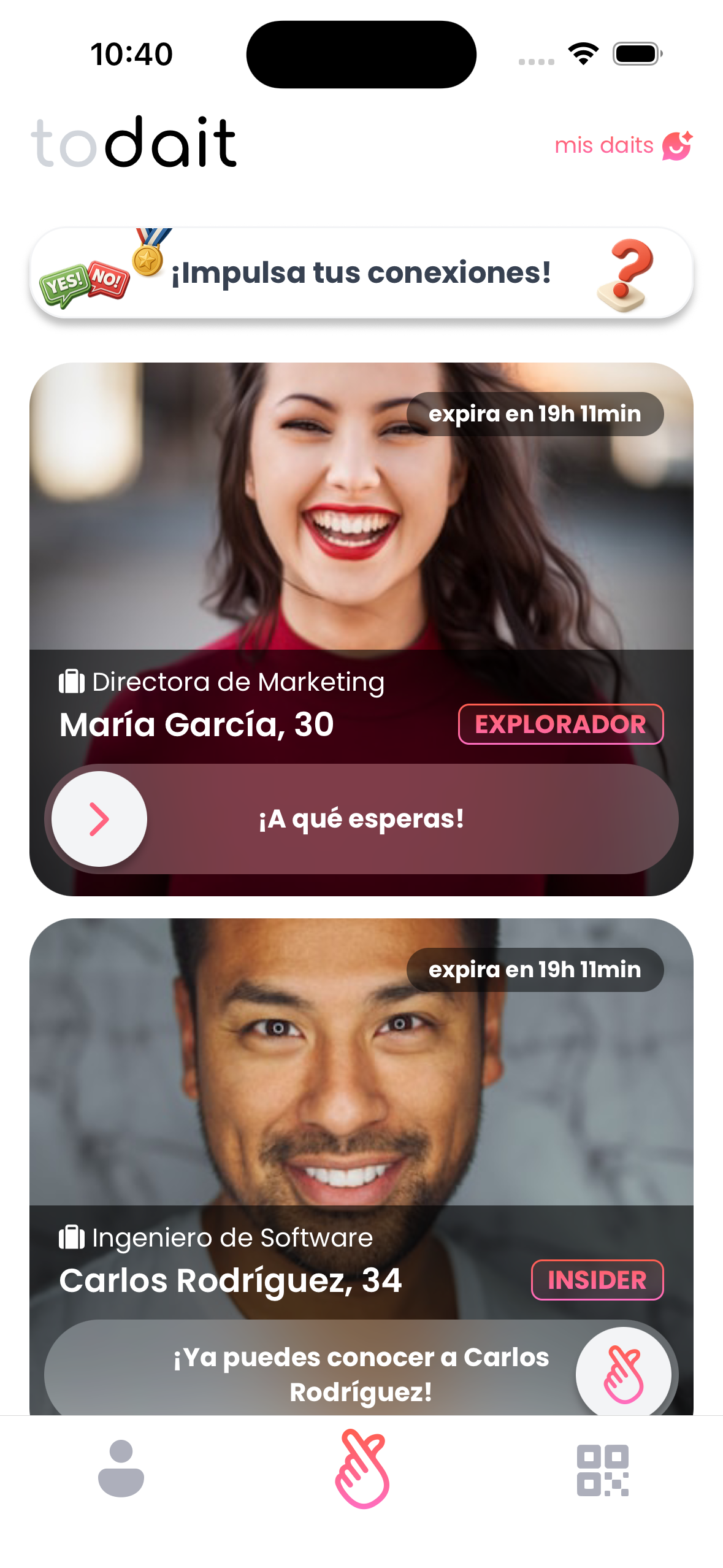
Two candidate cards become part of a flow that invites action instead of passive browsing.
Once the candidate is accepted, the transition acknowledges the moment instead of treating it like a silent state flip.
One app, implemented end to end
As sole app engineer, I implemented DAIT's mobile application in React Native and Expo: the architecture, app structure, flow logic, gesture-heavy interactions, data handling, the integrations needed to support its product behavior.
As a founder, I was also part of deciding what deserved to exist at all. That overlap between product scoping and implementation is one of the main reasons this project represents me well.
Selected Implementation Peeks
Swipe quiz behavior
The green-versus-red-flag quiz is not a static form. Each card needs to track question changes, measure dwell time, and turn directional gestures into explicit answers.
That combination lets the flow feel expressive while still giving the product useful structured data.
useAnimatedReaction(
  () => activeIndex.value,
  (current, previous) => {
    if (current !== previous) {
      scheduleOnRN(handleQuestionChange, current)
    }
  },
  [quizData]
)

const onSwipeRight = () => handleResponse(question.id, 'green')
const onSwipeLeft = () => handleResponse(question.id, 'red')
const onSwipeDown = () => handleResponse(question.id, 'neutral')
QR scan to live compatibility
The live flow is driven by QR data, camera permission state, haptics, and route transitions. Once a valid scan lands, the user is pushed into a shared profile route that can continue toward compatibility and connection.
The important thing here is continuity: scan, confirm, continue.
function handleBarCodeScanned({ data }: { data: string }) {
  if (scannedRef.current)
    return

  if (isValidScannedData(data)) {
    const userId = extractUserIdFromScannedData(data)
    if (userId) {
      scannedRef.current = true
      Haptics.impactAsync(Haptics.ImpactFeedbackStyle.Medium)
      router.push(`/sharing/u/${userId}`)
    }
  }
}
Zelia consent management
The consent gate is backed by explicit status handling rather than a vague boolean. The user can activate, revoke, and re-activate consent, and the UI reacts to those states clearly.
That matters because consent is a product feature here, not just an implementation footnote.
const consentStatus = userInfo.assistant_consent.status
const isConsentActive = consentStatus === 'active'

return isConsentActive
  ? (
      <Button
        title={t('zelia_privacy.revoke_cta')}
        onPress={handleRevokeConsent}
      />
    )
  : (
      <Button
        title={activationActionTitle}
        onPress={handleReactivateConsent}
      />
    )
React Native and Expo app structure, navigation, state, and flow composition.
Gestures, animated transitions, and feedback loops that make product moments feel alive.
Consent states, branching journeys, and social flows that needed to work beyond happy-path screens.
From building the app to improving how it gets built
DAIT began when AI played almost no role in my development process. It has since become one of the projects where I most actively refine agent-supported mobile workflows.
The product itself stays human-facing. What changed is the way I build, test, and inspect it.
Today I use DAIT as a real environment for exploring how coding agents can support React Native and Expo work without losing the discipline of verification.
What This Project Demonstrates
DAIT brings together the kind of work I want to keep doing:
- React Native and Expo engineering with whole-app ownership.
- Product thinking around scope, copy, trust, and journey design.
- Animation and interaction work that supports meaning instead of decoration.
- AI-supported mobile workflows grounded in a real product instead of toy examples.
If you are building a mobile product that needs both thoughtful implementation and product judgment, I would be glad to talk.